Showing posts with label Enterprise Risk Management. Show all posts

Friday, April 22, 2022

End to End Risk Management with MS Project and Primavera Risk Analysis


Imagine you are managing a large project, which is strategically important and complex. At the outset, you realize there will be a number of risks, which if not managed well, could paralyze the outcome and have negative impacts on the project objectives. You want to proactively identify, analyze, respond, track, and monitor your project’s risks. And, it would be great to have a dedicated risk management tool to use alongside your project management software.

What are your options? Will software tools like Excel help? Will a software tool for only project management meet your needs?

If you have ever managed risks, you know a spreadsheet is not the answer. A spreadsheet is not at all designed for project management–let alone risk management. It’s likely that a project management software tool only meets your need half-way.

One of the most frustrating experiences faced by management practitioners with respect to software tools and one response was related to risk management and tracking, specifically in a scenario where spreadsheets were being used. Another aspect that came to light was the need for an integrated and risk-adjusted schedule-cost management system, which brings up questions like: what are the duration estimates and cost estimates associated with the risks? How can a PM manage risks in with a single, centralized tool?

In this piece, I’d like to present an integrated approach to project management with strong end-to-end risk management capabilities. For this purpose, I’ll be using two software tools:

  • Microsoft Project (MSP) 2019 for project management, and
  • Primavera Risk Analysis (PRA) 8.7.5 for risk management.

The practical examples and samples for this article have been taken from Practical RMP with Primavera Risk Analysis, whereas the theoretical explanations are from RMP Live Lessons.

Let’s start with creating a project plan with MS Project. 

Create the Project Plan

While you can directly use PRA to create your project plan, most project managers use MSP frequently for planning because of its simplicity, ease of use, and user friendliness.  For this reason, we will create the plan first in MS Project. The plan depicted in the below figure.

The statistics of the project are these:

  • Duration: 38 days
  • Cost: $67,680 USD
  • Finish Date: June 30, 2021 (06/30/21)

The project is the creation of a Smart Site and involves multiple resources.

Do note that if you have modified the calendars for the project and/or have added custom calendars, you’ll need to ensure you have the corresponding calendars in PRA.

Set-up PRA for Risk Management

Before importing the plan, ensure that the settings for MS Project in PRA are correct. This can be opened by going to PRA tool’s File à Microsoft Project à Edit Default Import Mapping… menu.
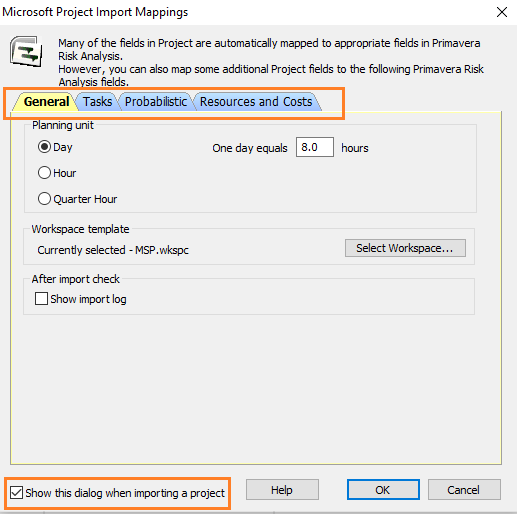
Keep the “Show this dialog…” checkbox enabled so that when you open the MSP Plan in PRA, you can have a quick look at the settings before actual import happens.

Import the MSP Plan into PRA

Now that we have set the MSP related settings in PRA, we will import the project plan created in MSP into PRA. It will happen in a few seconds. Post import, in PRA, the plan will be shown as below.

The imported project plan in PRA has the following statistics:

  • Remaining Duration: 38 days
  • Remaining Cost: $67,680 USD
  • Finish Date: June 30, 2021 (06/30/21)

This is perfectly in sync with the statistics of our project plan created earlier in MSP. It’s also a good idea to check a few of the tasks in the project to see that the import has happened properly. In our case, the task/activity “PRD Preparation” has been considered. It matches perfectly with the MSP Plan considering Dates, Resources, and Cost, among other fields.

Important Notes

At this stage, I’ll recommend that you read this Risk Management Framework for Projects article to understand how risks are managed and monitored over various Risk Management processes. Here, I’ll be using only the Risk Register, not the Risk Report.

In addition, I’ll explain some key points with respect to risk management, which will help you to understand why I’ve taken the following steps and performed the associated activities. Take a look at the video [Duration: 4m:12s] below—it’s been taken from RMP Live Lessons. For a better experience, you may want to go full-screen with HD mode and plug-in your earphones.


Risk Identification and Risk Register

Now, we are going to prepare the Risk Register. Preparation of this key project artifact happens during the Risk Identification process.

To create the Risk Register with PRA software, go to Risk à Register… menu, or click on the Risk Register icon on the Risk Toolbar of PRA. The Risk Register creation dialog box will pop up, and we will use the standard risk register option.


When the standard Risk Register first opens, of course, it will be empty as shown below.
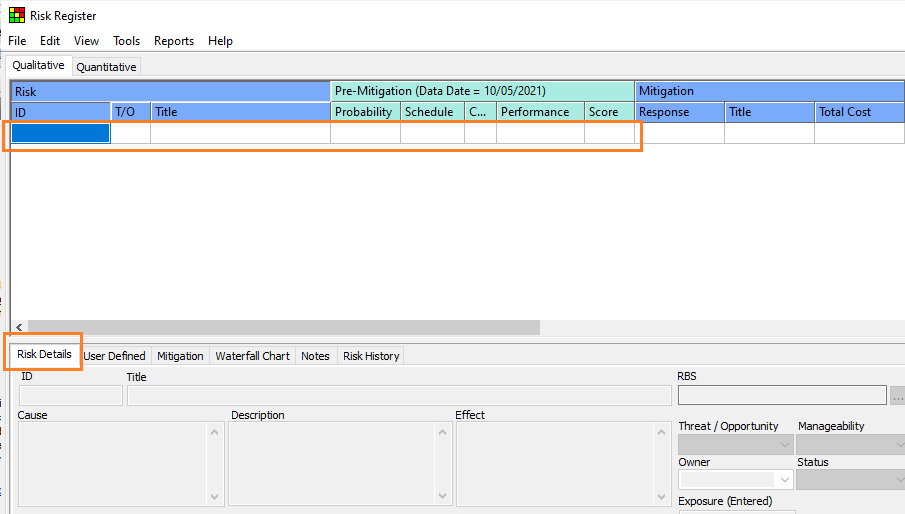

You can enter new risks easily by adding details for the identified individual project risks.

As you can enter the risks, provide all the needed information such as Risk ID, Threat or Opportunity, Risk Title, the Pre-mitigation information such as Probability scales, Impact Scales, etc. You can also add the Risk Details such as Cause, Effect, and Risk Category, among others.


As shown, we have four identified risks (threats) for this project with their respective details entered. The cause, effect, description, owner, RBS type, and status values have been entered for each of the risks.

Do not worry about the risk responses now. We will address them in the step for risk response planning as I explained in the earlier video. The risk score is calculated by taking the risk parameter values from the Risk Probability and Impact (PI) Matrix. For the sake of this example, I’ve used the following matrix.


The probability and impact scales notations in the Risk Register are these:

  • Very Low (VL)
  • Low (L)
  • Medium (M)
  • High (H)
  • Very High (VH)

As you multiply the probability and impact values, you will get the Risk Score. For more depth, refer to this detailed article on Risk Matrix Reporting.

Risk Qualification

Our next step is to qualify these individual risks. We will determine the probability and impact values of these risks. You can have other risk assessment parameters, as well, such as Risk Manageability or Risk Proximity, among many others.

Considering the probability and impact values of these risks, as we qualify them, the Risk Register will be updated as shown below.

As you can see, the current Risk Register has seen a number of updates. Considering Risk ID – 001, some of the key updates are:

  • Risk Score is now 21. (change from 72 to 21)
  • Risk Owner is confirmed. (John R is the confirmed owner)
  • Risk Status has been modified. (Status is “open” now; earlier “proposed”)

Similarly, we have also qualified other individual project risks: Risk 002, Risk 003, and Risk 004.

Risk Quantification

This step of risk quantification is optional, as we have seen in the RMP video. Though our project is a simple one, let’s do risk quantification for one individual risk (Risk 001: Poor understanding of design specification). After quantification of this risk, the pre-mitigated Quantified Risk Register will show as follows:


Note that Risk 001 has now been quantified from a schedule perspective by associating it with two tasks in the Project Plan, i.e. Task ID 000009 and Task ID 000010, from “Phase – 1” under the WBS element of “Design and Development Phase” at Level – 2 of the work breakdown structure (WBS).

I’ve used BetaPert probability distribution for the tasks mentioned and have entered the minimum, mostly likely, and maximum duration estimates. Similarly, you can also quantify with respect to cost estimates.

Post quantification, you can do a variety of analyzing such as:

Risk Response Planning and Response Integration

Next, we will do the risk response planning for the individual risks to bring down the probability and/or impact values of these risks. With this, we can keep the risk score within the risk threshold.

For this purpose, we again have to go to the Risk Register and modify the risk response strategies along with the associated risk response actions. The modified risk register is shown below.


Considering “Risk 004: Key resources unavailable,” the Risk Score has been reduced from 56 to 1, and similarly for certain other risks.

For Risk 004, the associated actions are noted under the highlighted “Mitigation” tab. There are two mitigation response actions:

  • Risk Response Action – 1: Get the resources from other functional departments.
  • Risk Response Action – 2: Prioritize project resources.

The assigned risk response owners and associated cost are noted. The associated cost also reflects on the top panel for Risk 004.

Risk Monitoring and Tracking

Our final step relates to risk monitoring and tracking. During risk monitoring, new risks may be identified, an existing risk status can change, an existing risk can become obsolete, or an existing risk may not occur.

Let’s say a new positive risk (opportunity) is identified, and we need to add this risk into the register. As we have seen earlier, risk management is both iterative and integrative in nature. 


As shown, we now have a new risk—“Risk 008: Reuse of previous design module.” As this risk is freshly detected, default values have been populated. The blue letter “O” represents an opportunity.

Subsequently, we have to determine the initial characteristics of this risk, followed by qualification and quantification (optional), and have the needed risk response strategies with associated risk response actions. Finally, we have to monitor this new adjusted risk with response and associated actions.

As we reach the end of this article, some of you may be thinking can this risk register be exported to MS Excel? After all, not all stakeholders will have MS Project 2019 and Primavera Risk Analysis software installed.

The answer is yes! You can export the Risk Register to MS Excel by going to Risk Register’s File à Export Risk Register As… menu. From there, while saving, choose “Microsoft Office Excel (.xls)” option to save.

With this process in mind, I believe you will have a sound understanding of end-to-end risk identification, analysis, response planning, and implementation, followed with risk monitoring and tracking.


--

This article was first published by MPUG.com on 18th May, 2021.


References:

[1] Online Course: Practical RMP with Primavera Risk Analysis, by Satya Narayan Dash

[2] Online Course: RMP Live Lessons, Guaranteed Pass, by Satya Narayan Dash

[3] Online Course: MS Project Live Lessons, by Satya Narayan Dash


Thursday, March 31, 2022

Enterprise Risk Management (ERM) and Risk Governance


Let’s consider the following scenario based true events which occurred within an organization I worked closely with recently. This company had a long-running project with a number of uncertainties. Risks were identified, then qualified, and risk responses planned. For implementation of these risk responses, a number of actions were needed. Some were taken, but most ignored or overlooked because of other projects and lack of understanding of risk management at an organizational level.

I came to know that there were no consistencies within risk governance parameters, such as risk appetite, or risk threshold, for example. In fact, there was no structured and uniform way to define the probability and impact scales, no standard form of risk reporting, and little to no accountability for addressing risks. Hence, when risks were reported, team members didn’t understand, or if they did, they wouldn’t know how or whether to act.

What happened?

As you may have correctly guessed, this project was in trouble. And, despite, it continued to run for a long time! It was a classic watermelon project, where everything looks green from the outside, but is all red when you open it.

In this article, we will explore how to manage such massive gap at an organizational level considering Enterprise Risk Management and Risk Governance. If you are preparing for the Risk Management Profession (RMP) examination, you need to be aware of both these concepts. In fact, in a recent RMP Success Story, a senior program management professional emphasized it.

What is Enterprise Risk Management?

Projects can exist independently, but usually they exist within a program or a portfolio, which in turn are held within an enterprise or organization. In most cases, such is the case for a program or portfolio. Hence when we talk of risk management, we also need to know how risk management happens in the context of enterprise: It has been found that organizations require risk management practitioners to use the risk management practices in project, program, and portfolio management, which are an integral part of the ERM framework.

In other words, ERM addresses risks at an enterprise or organizational level. ERM also addresses all the risks associated with an enterprise’s portfolios, which internally contains all programs and projects. A “Risk Governance Framework” for an organization is set at the enterprise level. There is a governance board which oversees the ERM and its framework.

On the other hand, portfolio risk management derives its policies, processes, methods etc. from the ERM framework, and program risk management, as well as project risk management, adopt their risk management practices from the portfolio risk management umbrella.

Why Go for Enterprise Risk Management?

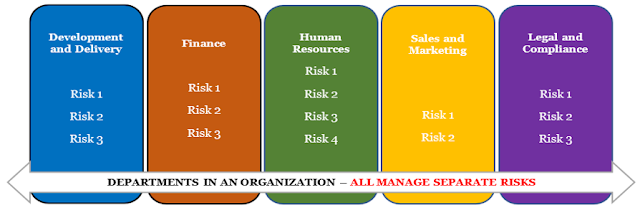
Enterprise risks are also known as the business risks, and organization leaders must manage these to stay relevant and stay in the business. Typically, an organization runs many individual departments such as Development and Delivery (or Production and Distribution), Finance, Human Resources, Sales and Marketing, Legal and Compliance, among others.

All these functional departments may have their own risk management as shown in the below figure.

If the risks arising within these departments are managed individually, without a holistic or overall view of the risks from the organization’s perspective, the result is siloed risk management.

PPP Approach to ERM

Alternatively, organizations can take a common approach to risk management across the organization or enterprise, considering all the departments. In a projectized organization, ERM will consider all layers of management – project, program, and portfolio (PPP).

Portfolios of programs, projects, and operations are created to achieve strategic goals and objectives. In other words, portfolios are created to achieve an organization’s strategic goals and objectives. A portfolio internally contains programs and projects.

Considering PPP based management approach, the following should be noted about ERM:

  • Enterprise risk functions and management are performed by the Executive Management.
  • The ERM process is also determined by the Executive Management.
  • Best suited to handle ERM, the Executive Management is accountable for strategic goals and objectives.

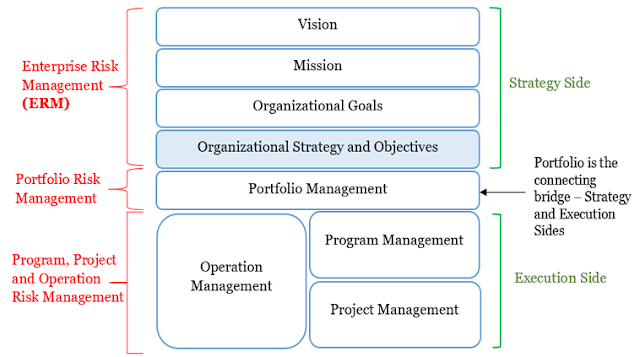
Based on this understanding, we follow the below figure:

As shown, ERM supports an organization’s vision, mission, goals, and strategies. In fact, this support is the main objective of the ERM.

ERM Considerations for PPP Based Risk Management

ERM ensures that all organizational risks are properly identified, addressed, managed, and monitored. However, for the best application of ERM, a common approach to risk management is needed. This is because ERM should be considering all of the organization’s risks as an interrelated collection.

A common approach to risk management enables two things:

  • Normalization: The risk prioritization schemes, risk probability, and impact scales for the risks are standardized across the board.
  • Aggregation: Aggregation results in a combination of a number of risks coming from the portfolios of programs and projects.

With normalization and aggregation, one can state the risk at any level in the organization, making it understandable to everyone. There can be bi-directional movement and management of risks, or a cascading of risks from a higher level to PPP level or escalation from the lower level to the enterprise level.

Hence, modifying our previous figure with respect to layers of risk management, we can consolidate and present as the below figure.

This bidirectional movement of risks, results in integration, as well as alignment of ERM and PPP risk management.

Governance and Its Elements

Governance, as the name indicates, is the way to govern an “entity.” The purpose of governance is to ensure that the “entity” is managed in a proper way.

Governance can exist at the level of enterprise/organization, portfolios, programs, or projects. In such cases, they will be known as respective governance or governance framework. The governance framework is part of governance.

The major elements of an entity’s governance are these:

  • The Governing Body is a temporary or permanent group of members with responsibility and authority. This body provides the needed guidance and decision-making for portfolios, programs, and projects. An example is an executive board.
  • The Governance Framework contains governing domains with functions, processes, and activities for projects, programs, and portfolios. Examples of domains are governance communications, governance performance, among others.
  • The Governance Domain refers to a group of functions carried out by an individual, group, or organization to address a specific area of concern.
    For example, the governance communications domain is about dissemination of information.
  • Governance Functions are a group of related processes executed/performed to support the governance of portfolios, programs, and projects.

The elements and interactions among the elements of governance are shown in the below figure.


Types of Governance

There can be various types of governance such as organizational governance, portfolio governance, program governance, etc. at the respective levels.

Organizational governance is a structured way to provide governance at the organizational level. The focus is to meet organizational strategic and operational goals.

Portfolio, program, or project governance refers to the framework, functions, and processes that guide portfolio, program, or project management activities, respectively.

Governance Vs. Management

At this point, you may be wondering:

  • What are the differences between governance and management?
  • Does not the portfolio, program, and project management exist to guide the respective management activities? If so, why is governance needed?

Yes, portfolio, program, and project management will still exist, but when it comes to governance there are some key distinctions, which can be summarized by this line.

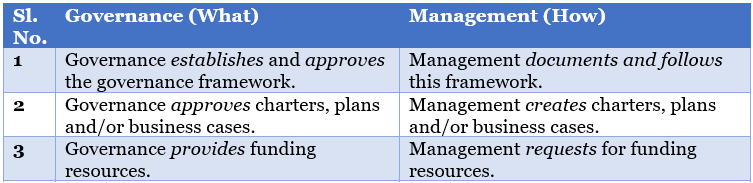
Governance informs the “what” aspects. Management, the “how” aspect. The “what” aspects are about decisions, guidance, and ensuring PPP management. The “how” aspects are about organizing and doing the work.

Beyond the above key difference, I’ve noted some more differences between governance and management in the below table.


Risk Governance

With this background in mind, let’s now consider risk governance and the risk governance framework.

Risk management in the enterprise context is primarily about enterprise risk management (ERM), and it involves an integrated view of portfolio, program, and project management.

In this organizational context of risk management, these are the key points related to risk governance:

  • Risk governance is created, and the risk governance framework is also elaborated. Remember that the governance framework is an element of governance.
  • Within this framework, risks are identified at each level, i.e., the enterprise/organizational level or PPP.
  • Identified risks are analyzed—both qualitatively and quantitatively. Then, the best suitable governance layer is decided. It can be the portfolio governance layer, program governance layer, or project’s governance.
  • It’s possible that at each level of PPP governance, one can have a risk governance model, which is part of the corresponding P’s governance. For example, within the project governance, one can have project risk governance.
  • The respective governance layer decides on the escalated risks and what to do with them. Enterprise risks can be cascaded down to the respective suitable layer, if they can be managed at that level. As we have seen earlier, there can be bi-directional movement of risks in an organization.
  • Risk governance, at the chosen layer, guides in identification and assignment of risk owners. Next, it’s responsibility of risk owner to delegate risk actions to respective risk action owners.
  • Risk governance, at the chosen layer, guides on risk response strategies and risk response actions, which are associated with the response strategies.
  • Risk governance, at the chosen layer, also decides on the continuance or termination of a portfolio, program, or project.

Video – Risk Governance Vs. Risk Management  

Now, let’s look at the differences between Risk Governance and Risk Management.

For this purpose, I’ve put together a video [duration – 8m:36s], with additional explanations. For a better audio-visual experience, you may want to go full-screen with HD mode and plug-in your earphones. It’s one of many, from my RMP Live Lessons.


Conclusion

Let’s revisit the scenario explained at the beginning of this article, where a project had been running without any proper risk management. If you’ve watched the aforementioned video, you should be able to answer the following questions:

  • How did the ‘watermelon’ project exist?
  • Why was it running for a such a long time with little or no risk management?
  • How come no one was held accountable for it?

More importantly, I hope you have realized the importance of both Enterprise Risk Management and Risk Governance. I welcome your feedback below in the comments section.


--

This article was first published by MPUG.com on 27th April, 2021.


References:

[1] Online Course: RMP Live Lessons – Guaranteed Pass, by Satya Narayan Dash

[2] Online Course: RMP 30 Contact Hours, by Satya Narayan Dash

[3] Book: I Want To Be A RMP, The Plain and Simple Way To Be A PMI-RMP, Second Edition, by Satya Narayan Dash

[4] The Standard for Risk Management in Portfolios, Programs and Projects, First Edition, by Project Management Institute (PMI)